Turn Off Hardware Acceleration to Improve Video
Quality
Today, almost all
software applications use multimedia including graphics,
audio, video, animation and text to make using the PC an
enjoyable experience. This directly translates into a
surge in demand for processing power, leading to the
manufacture of powerful video and graphic cards. The
Hardware Acceleration tab allows you to specify the
performance of the graphics hardware present on your PC.
All
applications have different hardware acceleration
requirements, depending on the task they are meant to
perform. Problems due to improper hardware acceleration
settings include - mouse pointer problems, corrupt
images, problems while working with or converting videos
in MPEG and DVR – MS formats, issues in playing video
files in different media players and display problems
with graphics in games. The symptoms include jerky
videos and applications running slowly or failing to run
at all. This problem is especially common in older PC's.
Turning off the hardware acceleration system wide in
Windows XP
You can turn off hardware acceleration completely or
turn it down system wide in the following manner:
- Click on Start
> Control Panel.
- In the classic view, double click on the Display icon.
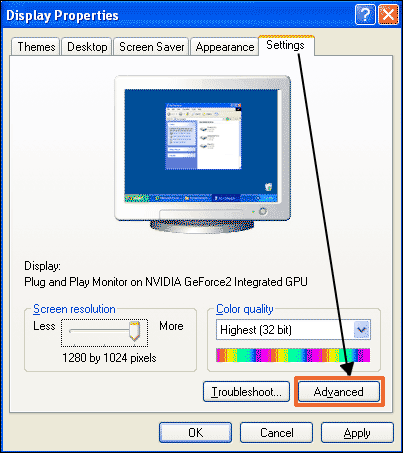
- Select the Settings tab and click on the Advanced button. The Advanced Settings dialog box
appears.
- Click on the Troubleshoot tab.
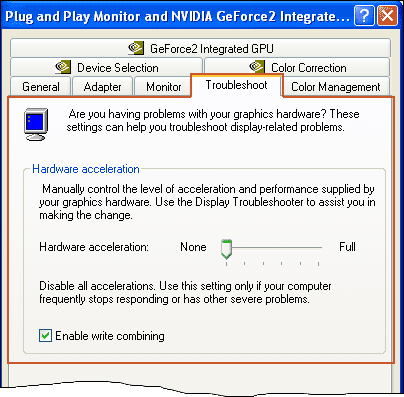
- You can disable the hardware acceleration
completely by dragging the slider to the extreme
left of the scale. You can also choose to turn
down the hardware acceleration by selecting an
intermediate value.
If the issue is resolved
with hardware acceleration turned off, the source of the
problem could be old video drivers for your video
adapter. In that case, you need to contact the
manufacturer of your video card to get the latest
drivers.
If you have installed
the latest video driver for your video adapter and you
continue to experience graphic issues with the Graphics Hardware Acceleration slider set to ‘Full’, try experimenting by reducing the
acceleration by one notch and checking the results.