|
Specify Action Rules
Action Rules tells Auto FTP Manager what files it has to transfer to which location in an Automated Transfer Profile. For example, you can specify a rule to transfer all the files from your PC to the server, from the server to PC, or in both directions. In addition you can set a rule in such a way that the files are moved to another location after transfer or just deleted.
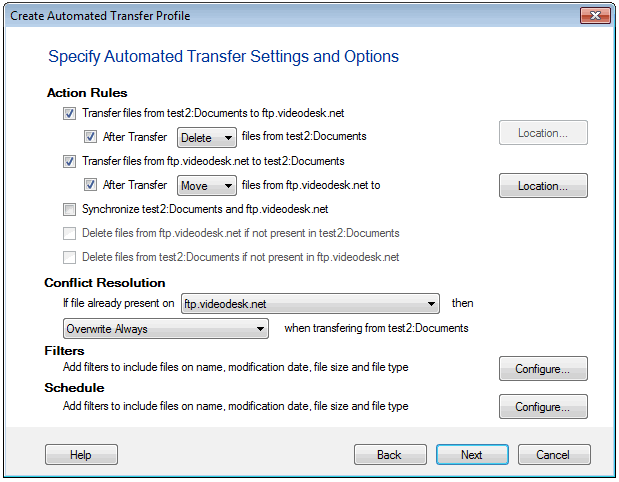
To add different Action Rules to your automated transfer profile, right click the profile and select Edit Profile >> Transfer Rules. You can specify any or all of the following Action Rules:
-
If the option Transfer files from<Folder 1> To <Folder 2> is checked then all files present in Folder 1 are transferred to Folder 2. You can even choose to Delete files from <Folder 1> After Transfer or Move the files to different location of your choice.
-
The rule Transfer files from <Folder 2>To <Folder 1> transfers files present on Folder 2 to Folder 1. You can choose to Move the files that are transferred to another folder by clicking the Location button. If you do not require the transferred files anymore, enable the option Delete instead of Move from the dropdown.
-
Synchronize <Folder 1> and <Folder 2> makes sure that the files present in both the folders are exactly same. The files not present in one folder are transferred to the other folder, so when you run the Automated Transfer, the two folders contain exactly the same files. This option is automatically selected when you check both the previous action rules.
-
You can have Auto FTP Manager delete files from the target folder if they are not present in the source folder. For instance, assume that you are transferring from Folder 1 to Folder 2. If Folder 2 contains a file named "Extrafile.txt", the option Delete file from <Folder 2> if not present in <Folder 1> deletes the file Extrafile.txt when you run the Automatic Transfer Profile.
Note: <Folder 1> and <Folder 2> will be replaced by your computer's name and the IP address of the server. You must note that the actual names of <Folder 1> and <Folder 2> will be used by the program.
Conflict Resolution
Suppose, you want to transfer a file from your PC to the server. If the file is already present on the server, there will be a conflict. Auto FTP Manager has a way to resolve this conflict easily with the help of Conflict Resolution rules. You can use this option only if you create an Automated Transfer profile.
Auto FTP manager provides the following conflict resolution options.
- Overwrite Always: The file in the destination folder will be replaced by the one in the source folder.
- Append Date and Time: The transferred file is renamed with the current date and time appended to its name, thus making the file transfer successful.
- Skip: The file will not be transferred which means no action will take place.
- Overwrite if date is newer: If the file being transferred was created after the existing file, the old file is replaced with the new one.
- Overwrite if size is larger: If the size of the transferred file is greater than the existing file, the smaller file is replaced by the larger one.
- Overwrite if date is different: If the file is present in both locations, it will be overwritten only if the modification date/time does not match.
- Overwrite if size is different: The existing file will be overwritten if its size is not the same as the transferred file.
- Overwrite if date/size is different: The transferred file replaces the existing one if their size and modification dates do not match.
|