|
Understanding the User Interface
Auto FTP Manager is an advanced FTP client, designed to make all your file transfers easier and quicker. The application interface is user-friendly and provides quick access to all the important functions.
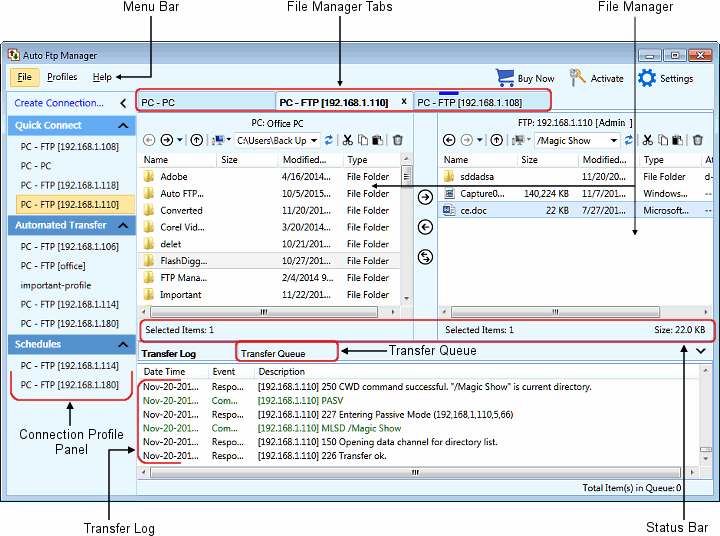
The following are the components in the application user interface:
- The Menu Bar contains all the available features of the application.
- With the Buy Now option present on the right side of the Menu Bar you can purchase the product right away and then Activate Auto FTP Manager with the help of the serial number. Along with that Settings option is also provided which quickly navigates you to application settings.
- There are 3 types of profiles in the Connection Profile panel: Quick Connect Profiles, Automated Profiles and Schedules. All created profiles will be listed in the corresponding section of the Connection Profile panel.
- You are provided with an explorer-style File Manager which allows you to drag and drop files from PC folder to server or server to PC easily.
- Auto FTP Manager's Tabbed-style interface helps you to manage multiple connections inside one window. To rearrange the position, you can drag the File Manager tab and drop it within the tab area.
- At the bottom of the File Manager is the Status Bar which shows the number of files and folders present in the folder and the number of items selected.
- Keep a time track of all the transfers with the help of Transfer Log.
- Transfer Queue maintains the list of all the files and folders waiting to be transferred, currently transferring or failed items.
|