|
| Auto FTP Manager: Proxy Settings |
Proxy Settings
You can connect your PC to Internet either through a Proxy server or directly. If your computer connects to FTP through a proxy server you will need to enter your proxy settings here.
-
Direct Connection: To choose Direct Connection select it from the Connection Type dropdown. There is no need to provide Host IP Address and Proxy Port.
-
Proxy: When you connect through a proxy, specify the Proxy IP Address and Proxy Port. You can choose SOCKS v4 or SOCKS v5. Specify Username and Password if required.
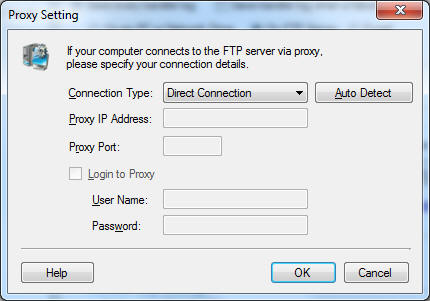
To get the default proxy on your machine, Click on Auto Detect.
|