| Site Translator : Configure Translation Memory |
Configure Translation Memory
The Translation Memory is designed to improve the quality and efficiency of the machine translation process. If used effectively, the Translation Memory feature can improve consistency, personalize translation, and speed up the translation process. Translation Memory is updated for every translation. New records are added to the Translation Memory and the least frequently used records are replaced.
Whenever a page is translated, each sentence up to a certain length and its translation is added to the Translation Memory. The next time this sentence is detected in the document, the program automatically uses the same translation. Using Translation Memory, instead of the translation server, speeds up the translation process.
To view or edit the Translation Memory, click Tools >> Translation Memory or the toolbar button.
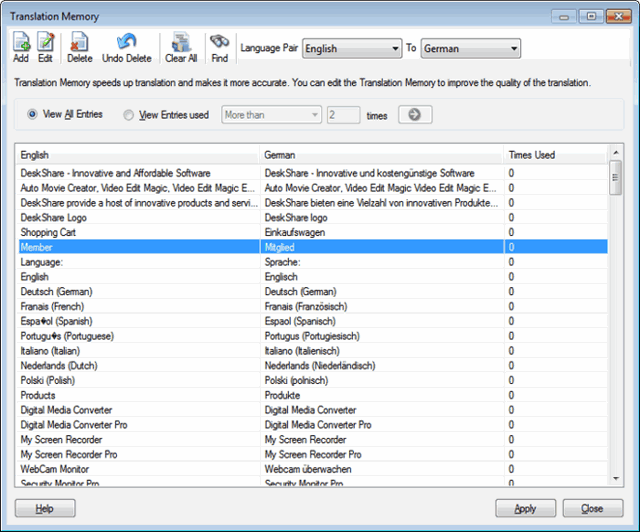
Use the toolbar to Add, Edit, and Delete records in order to customize translation. Clear All deletes all the records from the language pair. The next time, Site Translator begins with a new list. If you would like to change the translation of a word or phrase use the Find option. The Language Pair drop-down menu lets you choose which phrase list to view. In the illustration, we are viewing the "English to Spanish" phrase list. The program maintains a separate list for each language pair. For instance, there are English-German and German-English lists.
By default you will View All Entries for the selected language pair. If you select View Entries used, you can see the words and phrases that have been translated either Less Than, More Than, or Equal To a certain number of times.
The setting shown above will list only entries used 0 or 1 time ("less than 2"). After the selection, click the  icon. icon.
Add Entry
You can also add phrases and words directly to the Translation Memory. Hence, you can customize the translation according to your use. For instance, in Spanish "archivo" is normally translated into English as "file", but it can also mean "archive". If your web site is about libraries, you can add "archivo nacional: national archive" to the Translation Memory for Spanish to English translations.
To add a word or phrase to Translation Memory, open the Translation Memory.
Now select the language pair you wish to modify (for instance, "English >> Spanish"), and click Add. The Add Entry window appears.
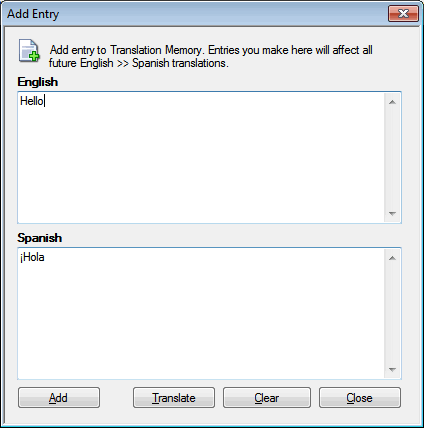
Enter a word and its translation, and press the Add button to add it to the Translation Memory. The Add Entry window remains open, so you can add several entries.
If you would like to see Site Translator's default translation for your phrase, click Translate after entering a word in the top blank. The program will find the best translation of the phrase. You can then edit or replace this before clicking Add.
Click Clear to remove the entries from the top and base of the window.
After you have made the necessary changes, click on the Close button.
Edit Entry
You can edit any entry by double-clicking it or selecting it and clicking the Edit button.
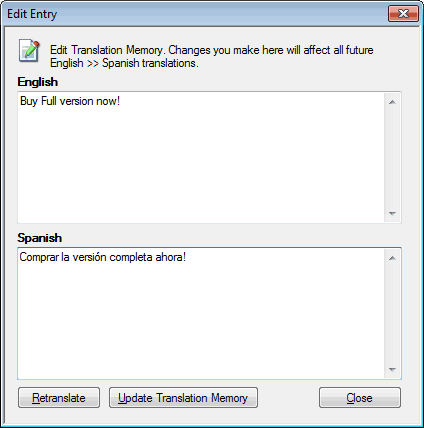
After making the required change, click Update Translation Memory. To see the server's translation of the phrase, click Retranslate.
Delete an entry by selecting it and clicking Delete. If an entry is deleted, Site Translator will translate that word/phrase using the translation server.
To clear all the words and phrases stored in the Translation Memory for a language pair, select that language pair and click Clear All. If you do this, the program will connect to the translation server for all translations between those two languages, and begin adding new entries to the Translation Memory as soon as you start translating.
|