DeskShare homepage
.
  Resources  
 
 
Pages:
  
1.Welcome - Site Translator
2.Translate Files
 
Words to Exclude
Tags to Exclude
Profiles
3.Translate Websites
4.Command Line Interface
5.Working with Translation Memory
6.Settings
7.Troubleshooting Tips
8.Resources
 

Site Translator 3.44


Site Translator : Words To Exclude From Translation

Words To Exclude From Translation

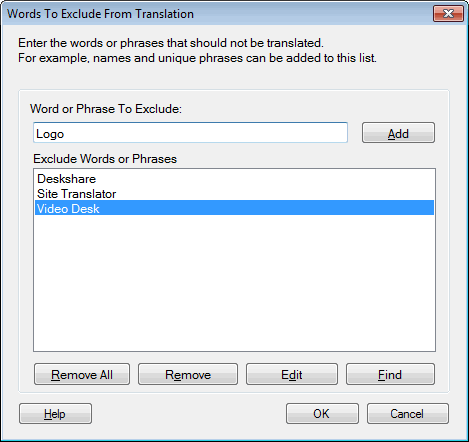
There will often be words and phrases that you do not want to translate.  For instance, names of people and products are generally not translated.

Exclusion List

To create a list of words not to translate, on the Translate Files tab click the Words To Exclude button.   The Words To Exclude From Translation window appears.  Type the words or phrases you would like to leave untranslated in the Words or Phrases To Exclude area and press Enter, or click Add.  You can Find, Remove and Edit  existing entries by selecting them and clicking the appropriate buttons.  After the selection,  click on Close.

The list is read and used before the Translation Memory.  The words or phrases in this list will not be translated even if it is present in the Translation Memory.

Copyright © DeskShare Incorporated. All rights reserved.