Display Drive Information
The drive information option displays technical details about your disc drives.
Click Tools >> Drive Information.
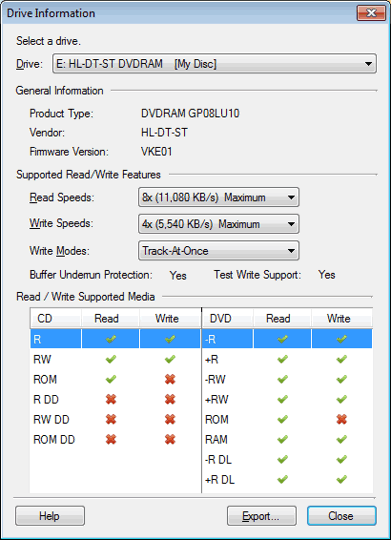
Choose a Drive from the drop-down list to get its information.
The General Information includes the details like the type of the drive, the vendor of the drive, and the firmware version. You can check the manufacturer's web site for possible firmware upgrades that may add additional features to your drive or improve performance.
You can view the maximum reading and writing speed of the drive. These speeds differ for CDs and DVDs.
Track-At-Once writes individual data segments (called "tracks"). When you choose this option, you can subsequently add more data to the disc.
Disc-At-Once writes all the data to the disc in a single operation with no pauses or gaps. Once a disc is written, you cannot add more data to it. However, RW discs can be erased and reused.
The Supported Media section lists the types of disc that this drive can read and/or write. Click here for information on various disc types.
Buffer Underrun Protection protects you from creating unreadable discs. This feature is important so that if data is not delivered to the drive fast enough, the disc is not ruined. Drives with Buffer Underrun Protection store some extra data in special memory. If the data flow from the PC slows down, there is some "extra" data that can be used to keep writing continuously.
If you will be using the Drive Information to assist technical support in solving a problem, you can Save the results as a text file which can then be emailed to the support representative.
|