Configure Flash Video Properties
Flash Video is the most popular file format for video played over the internet. It is used by YouTube, Google Video, Yahoo Video and MySpace. Flash Video is supported by most operating systems and web browsers. Flash Video is a video file format specifically designed to be streamed from servers on the web. FLV files are played using a player embedded in a web page.
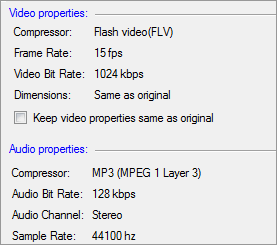
Video Properties
With Flash Video compressor, a lot of bandwidth is saved and it produces videos that can easily be shared on websites. The frame rate is set to 15 fps, and the bit-rate is 1024 kbps.
Audio Properties
MP3 (MPEG 1 Layer 3) codec enables playback of files encoded in the popular MP3 music file format. The frequency is set to 44100 Hz, and the bit-rate is 128 Kbps. The Stereo audio channel creates an impression of sound heard from various directions.
|