Configure MPEG 1 Properties
MPEG (Moving Picture Experts Group) version 1 is the compression method used to create VCD (Video CD) and SVCD (Super Video CD) discs. MPEG 1 is extremely an widely-supported media compression system. It does produce larger files and lower quality video than some of the newer compression systems, such as MPEG 4.
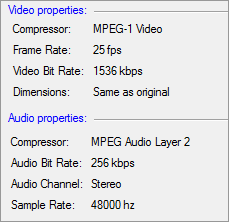
Video Properties
MPEG 1 compressor compresses the video without excessive quality loss and makes it easier to make video CDs. The frame rate is set to 25 fps and the bitrate is 1536 kbps. Dimensions of the source video file is retained.
Audio Properties
MPEG Audio Layer 2 compressor is very helpful for audio broadcasting. The frequency is set to 48000 Hz and the bitrate is 256 kbps. The Stereo audio channel creates an impression of sound heard from various directions.
|