Configure WAV Properties
WAV files have the highest possible quality at a given bitrate, but are very large. This is a good option for archiving or editing purposes. WAV files are compatible with Windows and Mac PCs and some portable players.
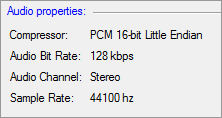
Audio Properties
By default, the compressor that is selected is PCM 16-bit Little Endian. The frequency is set at 44100 Hz, bit rate at 128 Kbps and audio channel on Stereo.
|