|
| Digital Media Converter Pro: Search and Include Files for Conversion |
Search and Include Files for Conversion
To find all media files in a folder (including its subfolders):
- On the File menu, click Search Folder or click the toolbar button labeled Search.
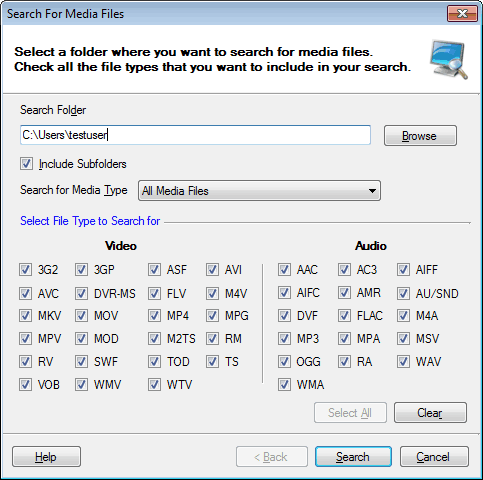
- In the Search For Files dialog, specify the folder to search. Either enter the folder path or browse for it by clicking Browse.
- Check Include Sub-folders, if you want the sub-folders of the specified Search Folder to be included in the search.
- Select the Convert to Format.
- Check all video and audio file extensions that you want to search for.
- Click Next to start searching.
- To remove one or more files after the search is complete, select them and click Remove.
- Click Finish.
Digital Media Converter Pro will start adding the files one by one to the conversion list. If Digital Media Converter Pro fails to add a file then a message giving information on why the file did not get added will be provided. This message will also give you instructions on what you need to do to enable Digital Media Converter Pro to convert this file. Refer to Having Trouble Including Files For Conversion for more details.
Note
The Convert to format selected while adding files not only applies to the files being added but also to the files already present in the conversion list.
|