MPEG 4 file format is used on iPod, iPhone, PSP, Nokia, Samsung, and many more popular devices.
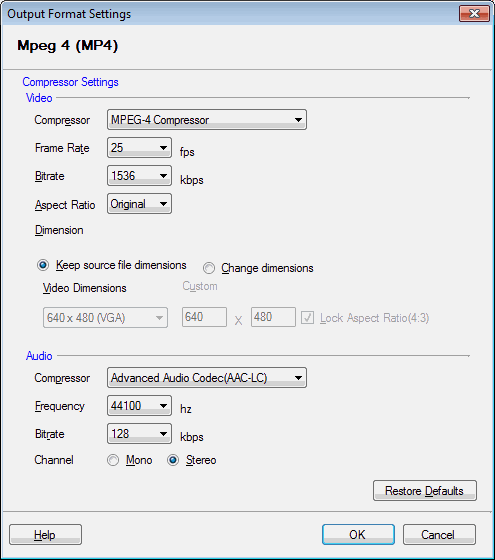
Click Formats >> Select Standard Formats >> MPEG 4 / MPEG 4 HD >> Configure.
MP4 files are saved using MPEG-4 compressor. The frame rate is set to 25 Fps, bitrate at 1536 Kbps for custom MPEG 4 file format. For MPEG 4 HD, the bitrate is set to 6000 kbps. By default, the video is created in a 4:3 display aspect ratio. You can choose to retain or change the dimensions of the video.
MP4 files are saved using the Advanced Audio Codec (AAC-LC) for sound. The frequency is set to 44100 Hz, and the bitrate is 128 Kbps. You can specify a variety of bitrates for the sound to be encoded. The higher the value the better the quality of sound. Setting high bitrates produces larger files.