DeskShare homepage Deutsch   Français    Español   Portuguese   
.
  Products  


Pages:
  
1.Index
2.Getting Started
3.Working With Media Files
4.Converting Media Files
 
Starting and Stopping Conversions
Select Files to Convert
Changing Conversion Settings
Configuring AVI Properties
Configuring QuickTime Properties
Configuring MPEG 1 and VCD Properties
Configuring MPEG 2, SVCD, and DVD Properties
Configuring MP4 Properties
Configuring Flash Video Properties
Configuring 3GPP and 3G2 Properties
Configuring WMF Properties
 
Configuring files for Desktop Viewing
Configuring files for Streaming
Configuring files for Web Server Progressive Download
Configuring Files For Portable Devices
Selecting an MBR Stream
Selecting Bit Rates
Configuring WAV Properties
Configuring MP3 Properties
Configuring AAC Properties
Configuring AC3 Properties
Configuring AMR Properties
Configuring M4A Properties
Configuring Ogg Vorbis Properties
Extract Only Audio
Converting Files to Play on the Apple iPod
Converting Files to Play on the Sony PSP
Having Trouble Converting Files?
5.Digital Media Converter Tools
6.Resources
 
 
  Digital Media Converter Pro v2.03


Digital Media Converter Pro: Configuring AC3 Properties

Configuring AC3 Properties

  1. After adding files to the list, click Tools >> Settings.
  2. Under General Settings, from the Convert To Audio Format box, select AC3.
  3. Select the Properties tab or Properties button.

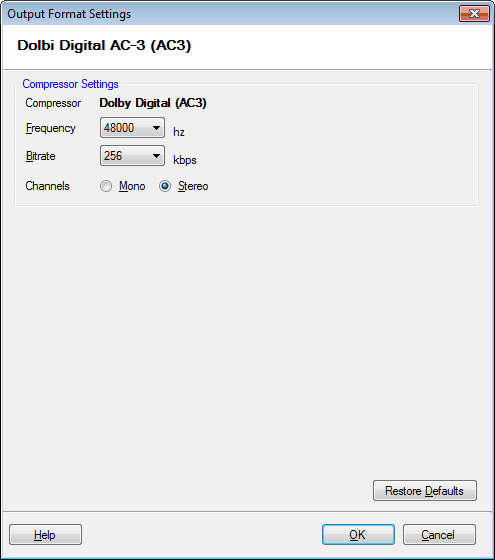
AC3 files store audio using Dolby Digital's proprietary compression method.  Optionally, these files can store 5.1 channels of audio information.

AC3 Properties

Frequency

Audio Frequency is the number of times per second that the audio signal can be adjusted. Higher frequency values gives better sound fidelity, but also increases the size of the audio. Select better quality for music and lower quality for speech. To change the audio frequency, select a value from the list.  The default is 48000 Hz.  44100 Hz is the frequency used in Audio CDs.

Bitrate:

The Bitrate is the amount of information that is stored in the file to represent each second of audio.  If you set a bitrate of 256 Kbps, a 10 second video file will contain 2,560,000 bits of information. The higher the bitrate, the higher the quality but also the larger the size of the file. 

Copyright © DeskShare Incorporated. All rights reserved.