DeskShare homepage Deutsch   Français    Español   Portuguese   
.
  Products  


Pages:
  
1.Index
2.Getting Started
3.Working With Media Files
4.Converting Media Files
 
Starting and Stopping Conversions
Select Files to Convert
Changing Conversion Settings
Configuring AVI Properties
Configuring QuickTime Properties
Configuring MPEG 1 and VCD Properties
Configuring MPEG 2, SVCD, and DVD Properties
Configuring MP4 Properties
Configuring Flash Video Properties
Configuring 3GPP and 3G2 Properties
Configuring WMF Properties
 
Configuring files for Desktop Viewing
Configuring files for Streaming
Configuring files for Web Server Progressive Download
Configuring Files For Portable Devices
Selecting an MBR Stream
Selecting Bit Rates
Configuring WAV Properties
Configuring MP3 Properties
Configuring AAC Properties
Configuring AC3 Properties
Configuring AMR Properties
Configuring M4A Properties
Configuring Ogg Vorbis Properties
Extract Only Audio
Converting Files to Play on the Apple iPod
Converting Files to Play on the Sony PSP
Having Trouble Converting Files?
5.Digital Media Converter Tools
6.Resources
 
 
  Digital Media Converter Pro v2.03


Digital Media Converter Pro: Configuring MPEG 1 Properties

Configuring MPEG 1 Properties     

  1. After adding files to the list, point to the Tools menu and click Settings.
  2. Under General Settings, select VCD-NTSC, VCD-PAL, or MPEG 1 from the Convert To Video Formats list.
  3. Select the Properties tab or Properties button.

MPEG (Moving Picture Experts Group) version 1 is the compression method used to create VCD (Video CD) and SVCD (Super Video CD) discs. MPEG 1 is extremely an widely-supported media compression system.  It does produce larger files and lower quality video than some of the newer compression systems, such as MPEG 4.

Read the articles: Understanding VCD, DVD and SVCD Formats and VCD, SVCD and DVD- Quality, Capacity and Media Types

The table below lists down the format in which MPEG files are made by Digital Media Converter Pro depending on the type of video disc selected.

Video Disc MPEG Format (Standard)
Disc Format Picture Standard Disc Type MPEG Type Dimension (pixels) Frame Rate (FPS) Video Bit-rate (Kbps) Audio Bit-rate (Kbps) Variable/Constant Bit-rate (VBR/CBR)
VCD NTSC CD MPEG 1 352 x 240 29.97 1152 224 CBR and VBR
VCD PAL CD MPEG 1 352 x 288 25 1152 224 CBR and VBR

NTSC is the picture standard used in USA and Japan, while PAL is used in almost all European countries. Constant Bit Rate (CBR) MPEG 1 files use the same amount of disk space to store each second of audio and video.  Variable Bit Rate (VBR) compression lets complicated video and audio use more space, but reduce the space used for simple segments.  This lets the quality be higher without making files larger.

Read the article: Convert Between PAL and NTSC

Making MPEG 1 Movies for VCDs

Steps to create a VCD:

  1. Make MPEG movie(s) that follow the standard.
  2. Burn the created file(s) to a CD.

Digital Media Converter Pro is able to make MPEG movies for various Video Discs as discussed in the table above. However, separate CD or DVD burning software is required to burn these MPEG movies to a CD or DVD.  

To make a VCD select the required format from Convert To Video Format list, then OK. The values required to create the correct MPEG Format are automatically filled in.

The options available are:

  1. MPEG 1 VCD (NTSC)
  2. MPEG 1 VCD (PAL)

Making Custom MPEG 1 Movies

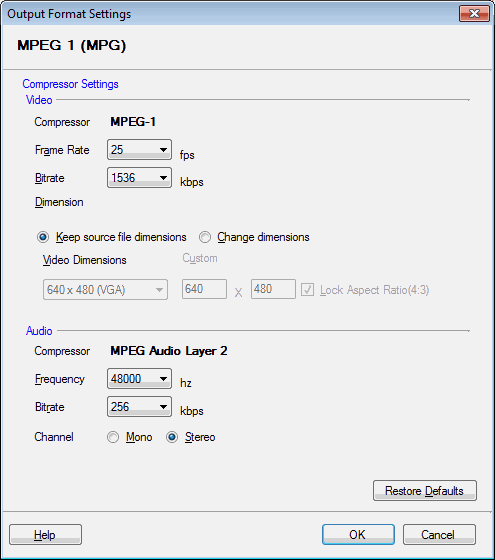
To make custom MPEG movies, select MPEG 1 from the Convert To Video Format list. Specify custom values for:

  1. Video Dimensions: 

    You can either convert your video to MPEG 1 files with the same dimensions, or to new dimensions you select. To use the original dimensions, select Keep source file dimensions. To change the dimensions select Change dimensions. You can either select one of the standard formats, or specify custom dimension. By default your converted file keeps the dimensions of the original file.

    • If you want to alter the aspect ratio of the video, select Change dimensions.
    • Increasing the size of a video can reduce the pictue quality. For example, if the file imported into your timeline originally had 320 x 240 dimensions, you should not save it to 640 x 480 pixels.  The resulting video might be distorted or "blocky" looking.   Reducing video dimensions can also result in unacceptable conversions, especially if there is a lot of detail in the picture.
    • The "Aspect Ratio" of a video image is the relationship between the width and the height.  Standard TV has an aspect ratio of 4:3, meaning that it is 3/4 as tall as it is wide.  Movies and HD TV have wider pictures, meaning a different aspect ratio.  If you choose to Change dimensions, you can unselect Lock Aspect Ratio.  If you know that you are converting widescreen movies, you should be sure that the dimensions you select are in the correct ratio before converting.
  2. Frame Rate: Select the frame rate in frames/second (FPS).
  3. Bitrates:

    The Bitrate is the amount of information that is stored in the file to represent each second of video or audio.  If you set a video bitrate of 2000 Kbps, a 10 second video file will contain 20,000 bits of information about video.  The audio and video bitrates are independent, so you can have a file with high quality video but lower quality audio, or vice versa.   The higher the bitrate, the higher the quality, but also the larger the size of the file.  Generally, smaller dimensions will allow you to use a lower video bitrate and still have a good quality picture.

    Specify both Video and Audio Bitrates.

  4. Audio Frequency: Specify the audio frequency of your choice. This is the number of times per second that the audio signal can be adjusted.  The higher the frequency, the higher the fidelity of the sound, but also the higher the bitrate needed to properly store the signal, and thus the larger the file size.  44100 Hz is the sampling frequency for audio CDs.
  5. Channel:  specify whether to save sound with one channel (mono) or with separate channels for the left and right speakers (stereo).
  6. Click OK to save the settings.

Read the article: Reducing Video File Sizes

Copyright © DeskShare Incorporated. All rights reserved.