Language:
 
 
Pages:
  
1.Welcome
 
What's new
User Interface
2.Getting Started
3.System Maintenance
4.Resources
 

IP Camera Viewer 1.2


Welcome to IP Camera Viewer

Set up an effective video monitoring system within minutes!  IP Camera Viewer allows you to view live video from your USB or IP cameras on your PC.  Use any USB or IP camera is to keep an eye on your home, office, parking area or anywhere you need security. 

View video from multiple IP cameras directly to your computer.  Currently more than 1500 different IP camera models from leading camera manufactures are supported.  It includes Axis, Canon, D-Link, Foscam, Panasonic, Mobotix, Pixord, Sony, Toshiba, Vivotek and many more.  You can send a request to our technical team if your camera or model is not listed in our application.  Virtually all USB cameras work with IP Camera Viewer.

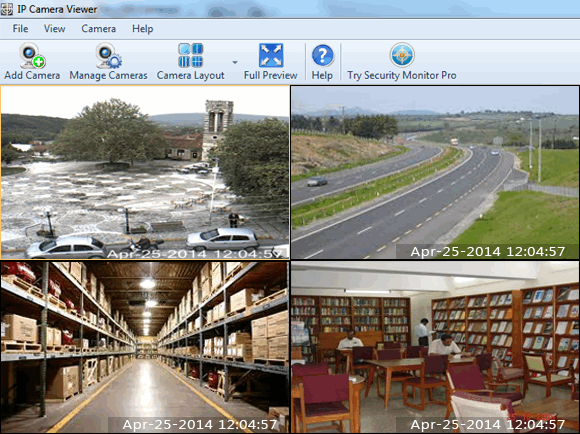
You can control and view up to 4 camera feeds simultaneously.  Get a live preview from multiple cameras with this light-weight application.  IP Camera Viewer's centralized camera and layout management allows you to view your cameras from multiple remote locations on a single screen.  You can change the arrangement and preview layout of the cameras, for your security needs.

Make the live video clearer by adjusting camera image and video properties.  It allows you to individually configure video properties such as resolution and frame rate for USB cameras.  You can set image properties such as saturation, brightness, contrast for USB and IP Cameras.

What if your camera is mounted upside-down or its preview is tilted a bit?  With IP Camera Viewer you can adjust the orientation of your camera preview.  It helps you to adjust the coverage area by supporting many PTZ (Pan/Tilt/Zoom) enabled network cameras.  IP Camera Viewer provides a digital zoom, even if it is not supported by your camera.

Flexibility of IP Camera Viewer allows you to set up a system that suite your needs.  It's absolutely free and ideal for both personal and business use.

Feature List

Live Previewing

  • Control and view up to 4 camera feeds, simultaneously
  • Use IP cameras as well as USB cams
  • Support for 1500 camera models and counting

Camera Configuration

  • Digitally zoom, even if camera does not support it
  • Pan/Tilt/Zoom (PTZ) support for many network cameras
  • Adjust the orientation of live feed

Advanced Camera Function Integration

  • Adjust image settings for IP camera
  • Independently configure video and image properties for USB camera
  • Backup and Restore cameras with individual settings


Copyright © DeskShare Incorporated.  All rights reserved.