Creating AVI Custom Profile
AVI files are larger than WMV files for the same audio and video quality. Use AVI, only if you want to edit or play the recordings with software or a device, that does not support WMV files.
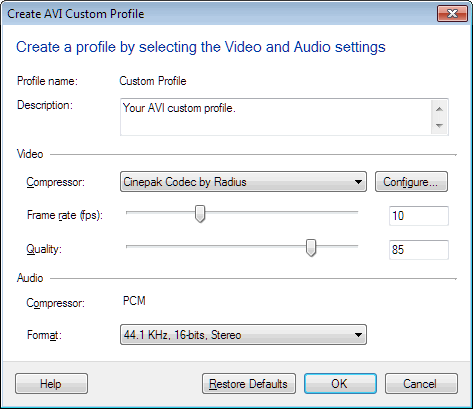
AVI Profiles have the following options:
- The Description field explains the purpose of the custom profile, so that you know when to use it.
- The compressors listed in the dropdown list of the Video Compressor, vary depending on which compressor you have installed on your computer.Note: Xvid Codec is not supported by My Screen Recorder.
- The Frame Rate is the number of times a video image is updated per second. Low frame rates can make fast on-screen motion seem abrupt. High frame rates can make the video look blurry if the bit rate is too low. For most screen-capture applications, frame rates between 5 and 10 fps are high enough. If you are recording fast motion or capturing video playback, the quality can be improved by raising the frame-rate value. In an AVI file, increasing frame rate results in increase in the file size. This is not the case when recording is done in WMV format.
- The Quality field controls the clarity of the video image. Higher quality produces larger files. .
- Press the Configure button to control highly technical details on how video is compressed. The exact settings that you can change depends on the Compressor you select. Unless you are an expert, you can ignore this option.
- All AVI recordings use the PCM Audio Compressor, which gives excellent quality of the recordings.
- In Audio Format field, the lowest audio format setting is adequate for voice recording, which is equivalent to telephone calls. The highest audio format settings, using 44.1 or 48 KHz, are equivalent to CD audio.