Seek Settings
Seek Settings allows you to set the Fast Forward and Rewind time interval during the playback of your recording.
In My Screen Recorder, you can open Seek Settings dialog using any of the following ways:
- Click on Play>>Seek Settings
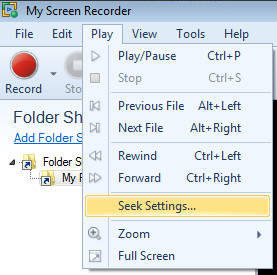
- Click on Seek Settings icon from Player control.
Seek Settings dialog
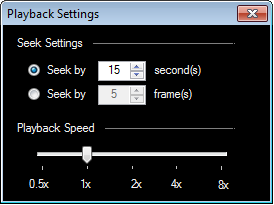
The default interval is set to 15 seconds or 5 frames (As shown in the above figure). You can increase or decrease the time interval to the desired number of frame(s) or second(s). If either of the options is selected, the recording will skip the playback according to the specified duration when you click on fast forward or rewind.
Playback Speed control allows you to speed up or slow down your video in media player.
|