Creating Video Executable
A video executable allows you to make your media files playable on a PC, without any requirement of an exclusive media player. It includes a built-in media player. You can now create EXE from your WMV, AVI, WebM and H.264 (MP4) screen recordings. It is an excellent distribution option provided by the application.
To Generate a Video Executable:
Click Tools >> Make Video Executable. Add media files to create an executable by clicking Add, or drag and drop the files in the list.
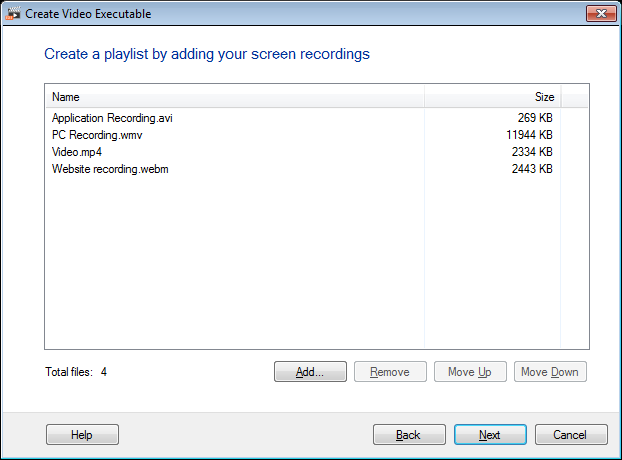
To arrange the order in which you want the files to be played in the player, use Move Up or Move Down buttons. Click Next.
The next step is to configure the playback and Password options.
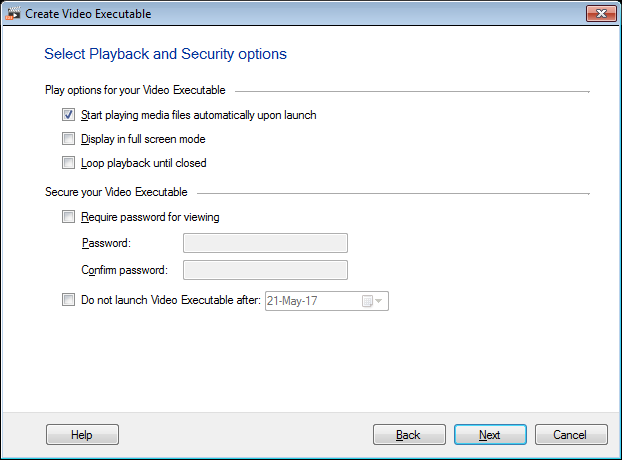
For all the files in an executable to play sequentially, select the option Start playing media files automatically upon launch. The executable can be viewed at a size that fits your monitor’s screen with the option Display in full Screen Mode.
Loop playback until closed option enables all the media files to play one after the other until you manually stop it. Provide a password security to your executable with the option Require Password for viewing. Set a password of minimum four and maximum 20 characters. If the password is lost, create a similar executable with a new password.
You can also set an expiry date to your executable with Do not launch Video Executable after option. This will prevent user to view the executable after the mentioned expiry date. By default the expiry date will be 30 days after the creation of the executable.
Note: .NET Framework 2.0 (Service Pack 2) is required to run the executable.
Click on the Next button to set an icon and include a splash screen.
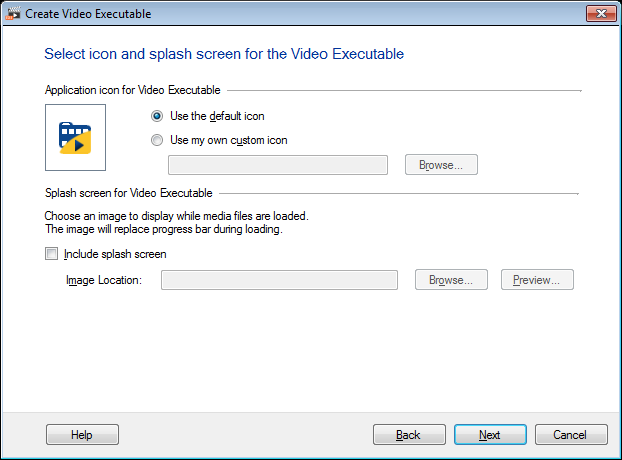
As all applications have an associated application icon, the video executable too has one. With the help of Use my own Custom icon option you can change the default icon and customize it with your desired icon.
Splash screen is an image that can be displayed at the program start up. If you have a splash screen, you can choose to make it appear before the video executable player is launched by enabling the Include splash screen option.
Set the Output settings with options such as Display title on Player title bar, File name of the executable and the location to save the executable with Save in option. Include metadata in your video executable, like the File description, Product name, Product version, copyright and Company to be more informative. The appearance of the video executable can be changed with the Color Scheme dropdown.
To open the folder where the video executable is saved, enable the option Open Containing Folder.
|