|
Understanding the User Interface
The application interface provides a quick access to all the important functions of Text Speaker.
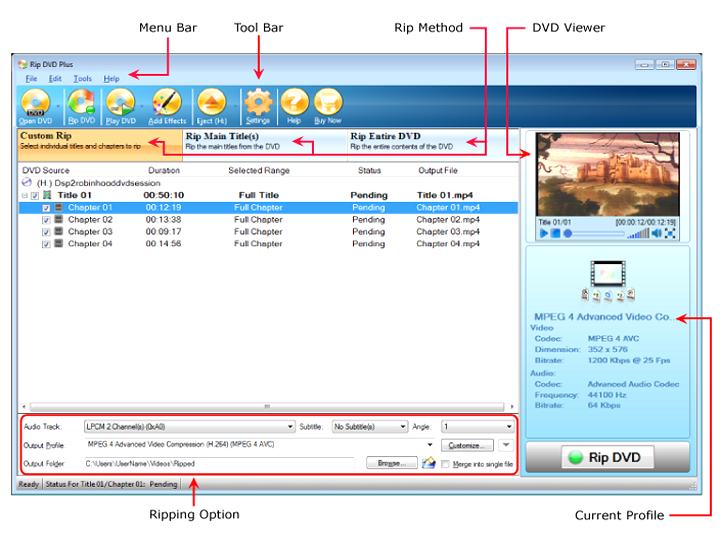
The main application window is divided into the following segments:
-
The Menu Bar gives you full access to every feature of the program.
-
Quickly access the most important and commonly used features from the Tool Bar. You can load the DVD files, rip the DVDs to play on any device, and play the DVDs in the built-in viewer. In addition, you may add various effects like color, brightness, contrast etc. to personalize the videos.
-
Choose a Rip Method to start converting your DVD. The most commonly chosen method is ripping the main title. The main title consists of the actual movie. In addition, you can select individual chapters and titles or the entire DVD to rip.
-
Play your DVD video in the built-in DVD viewer and view exactly what you want to capture.
-
In Ripping options, you need to select a output folder to save your ripped DVDs. An output format has to be chosen that suits your playback device. There is a option where you can merge different chapters and titles into a single file for continuous playback.
|