DeskShare homepage Deutsch   Français    Español   Portuguese   
.
  Products  


Pages:
  
1.Index
2.Getting Started
3.Quick Start
4.Application Settings
5.Working with Devices
6.Auto Configuration Wizard
7.Motion/Noise Settings
8.Types of Alerts
9.Working with Periodically Activated Alerts
10.Remote Monitoring
 
Configuring FTP Settings
Uploading Video, Audio or Snaps When Motion/Noise is Detected
Uploading Video, Audio or Snaps Periodically
Configuring the Proxy Server
Configuring the DNS Server
Configuring Video/Audio Streaming
Show Streaming Status
Show Upload Status
Assigning A Static IP Address to your PC for Live Streaming
Getting the IP Address of Your Computer
11.Media Files
12.Keyboard Shortcuts
13.Event Logs
14.Resources
 
 
  Security Monitor Pro v2.30


Security Monitor Pro: Getting the IP Address of Your Computer

Getting the IP Address of Your Computer

You can check both the private (internal) and public (external) IP addresses of your computer.  

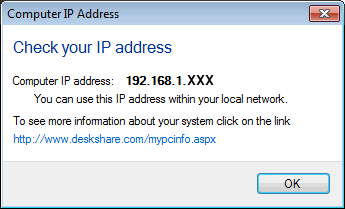
To find the private (internal) address, open the Tools menu and click on Get Computer IP Address.  Your IP address is displayed.

To see the public IP address of your computer (the address that must be used when connecting over the Internet), click on www.deskshare.com/mypcinfo.aspx

For an explanation of configuring your router to allow video and audio streaming over the Internet, read the article  Configuring Your Camera and PC for Internet Streaming.

Copyright © DeskShare Incorporated. All rights reserved.