Launching a Program when an Alert occurs
The Launch Program action lets you extend Security Monitor Pro to meet a specific requirement. You can run any program or a script when Security Monitor Pro detects a motion or license plate, which lets you perform any action that you can program the computer to handle. You can also send parameters to the program that you want to launch.
To configure Launch a Program action settings, click Camera >> Manage Cameras >> Edit Camera >> Actions >> Configure button of launch a program action 
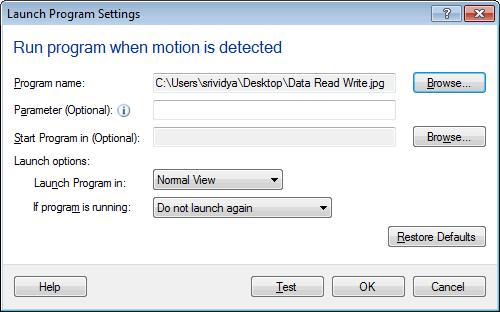
Run a program when motion or license plate is detected
Program name: Select a script file or a.exe or any file associated with the.exe. To select the file, click Browse.
Parameter: You can send command line parameters to the selected program. For instance, if you have selected Internet Explorer then you can pass the URL of a website as a parameter.
For License Plate Detector, you can optionally select Pass detected license plate numbers as parameter to launch the selected program for detected license plate numbers.

Start Program in: Specify the name of the folder that you want to set as the program's application folder. To select a Start in a folder, click Browse.
Launch options
Launch Program in: Select one of the windows mode and Security Monitor Pro will launch the selected program in this mode. By default, the Normal view is selected. You can launch the program in the following views:

Note: To Launch the program in any one of the above views, the selected program must support these views.
If a program is running: If Do not launch again is selected then program will be launched for the first time when motion is detected. It will not launch again until you manually close the program. If you have selected Launch after waiting for N minutes then on first time motion detection, selected program will be launched. If a motion is detected after N minutes then the program will be launched again.
After this alert is selected and configured, you can start monitoring. Depending on the configuration when motion or license plate is detected, Security Monitor Pro will launch the program.
|