Configuring Audio Alarm Settings
The Audio Alarm action plays an audio file of your choice whenever an alert is triggered. You can use this alarm to scare away potential intruders from the location you are monitoring.
For example, if you want to secure your room while you are not present, position your camera towards the door and configure it to turn on the audio alarm on motion or license plate detection. Now, whenever someone tries to enter your room, the alert will be triggered and Security Monitor Pro will play the alarm.
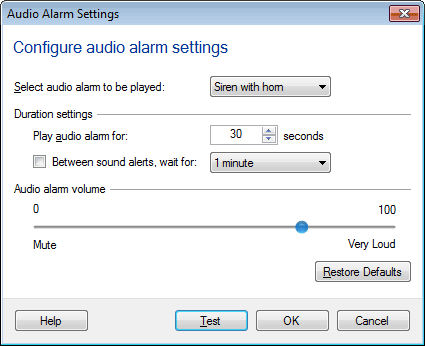
To configure Audio Alarm settings, click Add Camera >> Actions >> Configure button of audio alarm action 
Set Audio File
Select the audio file to be played from the drop down, when this action runs.
Duration
Play audio alarm for N seconds: It is the time duration for which the Audio Alarm will be played. On motion or license plate detection, audio alarm will be started and played for the selected time duration. When alarm is raised and before the duration, if motion or license plate is detected again then the audio alarm will not be restarted again.
Between sound alerts, wait for M minutes: When this option is checked then on motion or license plate detection, alarm will be raised for N seconds. When alarm stops then application will wait for M minutes. After M minutes, raise the alarm next time only when motion or license plate is detected after M minutes.
Audio Volume
Select the volume of the audio file on a scale of 0 to 100.
After this action is selected and configured, you can start monitoring. When a motion or license plate is detected, Security Monitor Pro will repeatedly play the specified file.
|