Language:
 
 
Pages:
  
1.Welcome
 
What's New?
User Interface
Camera Controls
2.Working with Cameras
3.Triggering Alerts
4.Choose Actions
5.Remote Monitoring
6.Scheduling
7.View Recorded Events
8.System Maintenance
9.Application Settings
10.Get Computer IP Address
11.Resources
 

Security Monitor Pro 4.48


Welcome to Security Monitor Pro

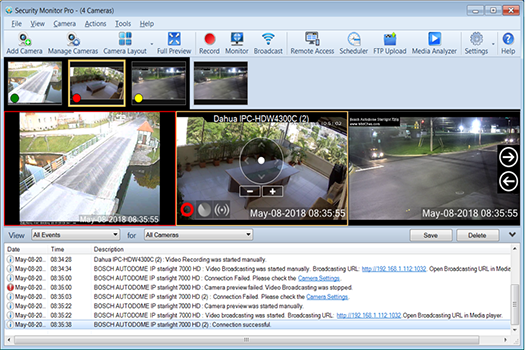
Watch your home, office, store, warehouse or parking lot from your PC via the Internet.  Easy to use and extremely reliable for day-to-day operation.  Configuration takes only a few minutes, even for a novice.  Currently more than 1000 different IP camera models and virtually all USB cameras are supported.  Security Monitor Pro has all the features you need and is the best choice in IP video surveillance.

Motion-triggered Alerts

When motion is detected, you can configure the program to create a video recording of the event, take photos, sound an alarm, or send you an email notification.

Total Customization

Designed to be highly configurable, each camera has its own settings for recording and alerts.  You can schedule cameras to monitor for motions at set times, on particular days of week.  Security Monitor Pro can automatically upload recorded videos and photos to an FTP server for backup or remote viewing on a website.

Reliable and Secure Recording

All events are captured with full details in an event log by date and displayed by camera name.  The events are recorded from the very beginning, a few seconds before the motion is detected.  This allows you to see the triggering event that happens in the first few seconds.  Security Monitor Pro preserves evidence of all activities for later viewing.

Feature List

Monitoring

  • View and Control up to 20 IP cameras and 8 USB cameras
  • Use IP cams (Ethernet or Wireless), USB cams and even analog CCTV (via converter)
  • Has the most extensive support for camera models, over 1000 and counting
  • Pan, tilt and zoom cameras to adjust coverage areas
  • Supports HD cameras, with multi-resolution recording
  • Backup and restore cameras with individual settings
  • Operate in hidden mode

Alerts

  • Set motion-triggered alerts individually for each camera, with adjustable sensitivity
  • Precisely define zones to be excluded from motion detection with the Mask Area feature
  • Get notified by email when an alert is triggered

Recording

  • Eliminate recording and storage of unnecessary video footage with motion-activated recording
  • Schedule your camera to automatically start recording or monitoring for motion
  • Add timestamp and watermarks to your footage to serve as an evidence for legal purposes
  • Upload recordings automatically to an FTP server

Review

  • Built-in Media Analyzer for fast review
  • Filter recordings by camera, timeline, media type
  • Play videos with 4x speed and view only key frames
  • Maintain a complete event log for all the cameras
  • Auto-deletion of old recordings to free disk space
  • Broadcast video feeds live on the internet


Copyright © DeskShare Incorporated.  All rights reserved.