DVD Quality, Compression, Capacity, and Media types
 DVDs are popular media for video content distribution. DVD Author Plus allows you to backup your valuable data by burning, copying or creating ISO images. Burn and copy your videos, audio files, pictures, documents to DVD and stop worrying about the loss of important data.
DVD stands for Digital Versatile Disc. You need to understand different DVD media types before creating a DVD.
DVD+R and DVD-R are Recordable and write-once format. Once recorded they cannot be edited, erased or changed for the rest of its digital life. These disks are compatible with all DVD players, even older ones. DVD+RW and DVD-RW are Rewritable DVD formats. Data on these disks can be erased and recorded many times without damaging the medium.
DVDs have a fixed pre-defined dimension. If you play them on your PC, they may seem to be distorted or stretched. However, the video should look fine on your DVD player. If you intend to burn your videos to DVD disc, the dimensions should be compliant with the dimensions listed in the table below. This is usually handled by the DVD burning software's.
Understanding DVD media can be puzzling at times. There are four common DVD types based on file size:
DVD 5:- also called a Single Sided Single layered, with a capacity of ~4.7 GB.
DVD 10:- also called a Double Sided Single layered, with a capacity of ~8.75GB.
DVD 9:- also called a Single Sided Dual layered, with a capacity of ~7.95GB.
DVD 18:- also called a Double Sided Dual layered, with a capacity of ~17.95GB.
TECHNICAL INFORMATION:
| Format |
DVD 5 |
DVD 9 |
DVD 10 |
DVD 18 |
| Resolution |
NTSC |
720x480 |
720x480 |
720x480 |
720x480 |
| PAL |
720x576 |
720x576 |
720x576 |
720x576 |
| Maximum Storage Capacity |
4.7 GB |
7.95 GB |
8.75 GB |
17 GB |
| Recording Time |
100-135 minutes |
20-240 minutes |
200-270 minutes |
240-480 minutes |
| Video Compression |
MPEG-2 |
MPEG-2 |
MPEG-2 |
MPEG-2 |
| Quality |
Good |
Better |
Very Good Quality |
Excellent |
Creating a DVD video with DVD Author Plus is a simple three-step process. Organize the videos, select the format plus quality of DVD and burn it.
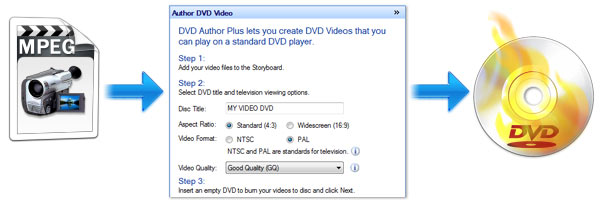
Go ahead and try DVD Author Plus for creating Professional DVDs.