Welcome to Auto FTP Manager
Auto FTP Manager makes it easy to schedule and automate your FTP transfers. Use Auto FTP Manager to connect to any FTP server and automatically upload and download files. Plan and automate your workflow. Let your PC move or synchronize files between PC to FTP Server, PC to PC, PC to Android mobile device, PC to Remote PC and FTP Server to FTP Server automatically according to a schedule.
Securely transfer all your sensitive information by using Secure File Transfer Protocol(SFTP) or FTP over SSL(FTPS) protocol. Connect to a FTP server directly or through various Proxy servers such as HTTP, Socks v4, Socks v5 or FTP Proxy server.
The easy-to-use wizard creates Action Rules, which define what files and folders are to be transferred. Automated Transfer Profiles can upload or download anything from a single file to entire folders, or synchronize two directories. With the help of advanced filters, you can exclude the files and folders from being transferred, apply different types of filters based on type, name, size or modification date, to help you transfer only those files which you wish to.
The built-in scheduler lets you transfer files once or on daily, weekly, monthly basis, on application launch or on folder change. The scheduler works as a Windows task service. This guarantees the file transfer will be performed at the scheduled time. Auto FTP Manager is multi-threaded, allowing you to open connections to multiple FTP servers at the same time. The program can transfer files in the background while you work on other tasks.
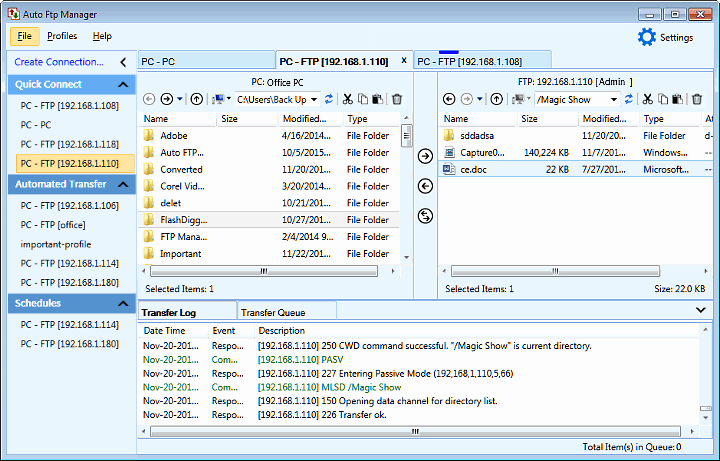
A powerful Quick Connect File Manager makes transferring files between your PC and an FTP server as simple as dragging from one location and dropping in another. The File Manager works like the Windows Explorer, enabling you to easily delete, rename and copy files.
Auto FTP Manager is an all in one package for managing, scheduling, and automating file transfers.
Auto FTP Manager User Interface
 |
Getting Started:
|
|