DVD Video Settings
When creating a DVD Video, you can set the video quality and the audio format to produce good quality discs.
Click Tools >> Settings >> DVD Video Options.
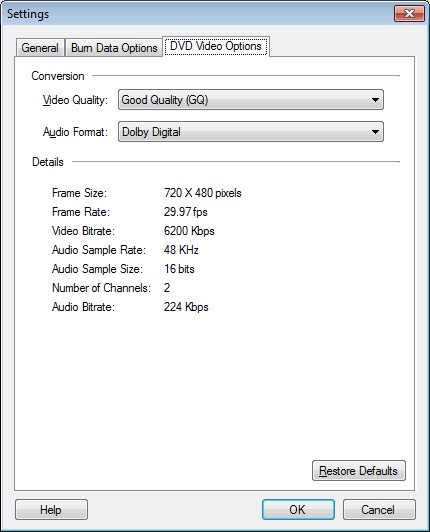
Choose the video quality from the dropdown. High Quality creates the best videos but takes the maximum space on the disc. You can record the videos of about one hour in duration.
Good Quality lies between the Standard Play and High Quality. It records for about one hour 30 minutes. In Standard Play quality, the quality is balanced with the duration. You can record up to two hours of video on the disc. In Standard long play, the quality lies between Standard and Long Play option. The duration of created video DVD is 2 hours and 30 minutes. With Long play quality, more data can be squeezed on the disc but not all players can play these videos. It can fit about three hours of video but the quality is like that of a video CD.
There are two Audio Formats available, Dolby Digital and MPEG 1 Layer 2. Dolby Digital (originally known as AC3 - Audio Codec 3) adds rich surrounding sound for both DVD and CD. MPEG 1 Layer 2 is used for audio broadcasting. It offers high compatibility so that you can play them back on any player.
Note: These settings apply only when creating a DVD Video.
|