Détection de scène et de la création de Clip
Une fois que les fichiers vidéo ont été ajoutées pour les vidéos et la Collection de Photos, la prochaine étape est de créer des clips. Auto Movie Creator Pouvez numériser automatiquement les fichiers vidéo et les diviser en clips basés sur des scènes. Le programme utilise un algorithme avancé pour déterminer quand les scènes début et fin basé sur la continuité visuelle.
Pour détecter les scènes, sélectionnez un fichier vidéo et cliquez sur le Détecter scènes bouton sur la barre d'outils ou un clic droit sur le fichier et sélectionnez « Détecter scènes » dans le menu qui s'ouvre.
La boîte de dialogue détecter scènes a un Sensibilité option. Vous pouvez déplacer le curseur pour augmenter/diminuer la sensibilité aux changements de scène. Sensibilité accrue conduirait à la création d'autres clips puisque même un léger changement dans la scène serait détecté et vice versa.
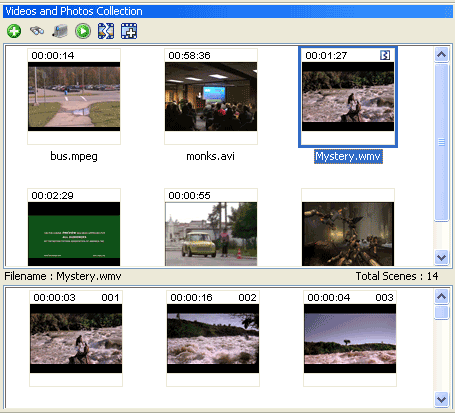
Clips sont créés et affichés dans les vidéos et la Collection de Photos dans une section distincte ci-dessous les fichiers médias, dans l'ordre dans lequel les scènes apparaissent dans la vidéo. Pas besoin de faire glisser ces clips à la table de montage séquentiel dans le même ordre qu'ils apparaissent ici, et vous pouvez supprimer les clips qui contiennent des séquences vidéo non désirées que ne pas être utilisées dans le film final. Partout où vous cliquez sur un fichier vidéo pour laquelle scènes ont été détectés, ses clips seront affichera automatiquement.
Chaque clip est numéroté et sa durée est affichée. Voir la Figure 1.
 |
|
Figure 1: Clips du fichier vidéo sélectionnée |
Notez qu'après les scènes sont détectés, le fichier est marqué avec le  icône. icône.
Vous pouvez sélectionner un ou tous les clips, faites un clic droit et choisissez Ajouter au Storyboard ou vous pouvez glisser-déplacer sur le Storyboard individuellement. Lorsqu'un clip est ajouté à la table de montage séquentiel, il est marqué avec le nom du fichier vidéo qu'il a été créé à partir de.
Informations de la scène on se souvient quand vous Auto Movie Creator fermer et ouvrir, aussi longtemps que vous laissez le fichier vidéo dans la vidéo et Photos Collection.
Si vous désirez des scènes de redect avec une sensibilité différente, simplement cliquez à nouveau sur le film et choisissez Détecter scènes .
Combinant des scènes
Vous pouvez combiner certaines scènes que vous avez ajouté à la table de montage séquentiel dans un clip unique, qui peut aider lors de l'ajout effets, narration ou musique. |