More Special Effects and Transitions for Video
Edit Magic
Your movies have to be
cool. You've got
the footage and sound
you want, in the right
order, but you need
more: you need to
add some dazzle.
Try the over 150
effects and
transitions in
Video Edit Magic.
If you want more— It's
easy to use additional
FX. Video Edit
Magic will work with any
DirectX transition and
effect "add-on packs"
that are installed on
your Windows XP
computer.
Note: Add-ons
will work only on
Windows XP and newer
systems. You may
even find some that work
with Windows 2000.
Installing new effects
and transitions couldn't
be easier. To help
you find some, there's a
list at the end of this
article. Download
one and run the setup
program. That's
all you have to do.
Video Edit Magic will
automatically detect the
new effects and
transitions. The
next time you start
Video Edit Magic, a new
tab will appear in the
Collections window:
Addon.
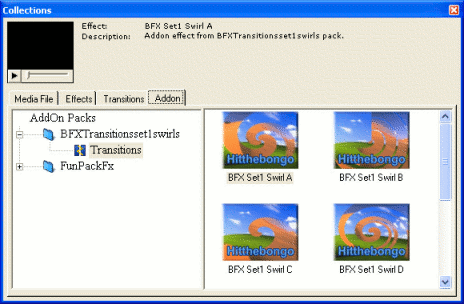
As you see, the
Addon tab lists all added
effects and transitions,
organized by which Pack
they came in. You
use them like the ones
that come with Video
Edit Magic, either by
right-clicking on them
or by dragging them to
the
Timeline.
We list a sampling of
DirectX effects and
transitions for download
here. There are
many others out there.
If you have a favorite
source that isn't listed
here, we would be
grateful if you let us know.
Package Type
Adorage Effects
Packs by ProDad Commercial
Rehan SpiceFX Packs
by Pixelan Commercial
Transition Effects from Hit The Bongo Free
Windows Movie Maker 2 Winter Fun Pack 2003 Free
DeskShare, Inc. does not
endorse these companies
or products. This
list is provided for
informational purposes
only and DeskShare
assumes no liability for
any damages caused by
the use of the products
mentioned therein.
With its ability to use
any DirectX transition
or effect,
Video Edit Magic gives you the ultimate
in flexibility and
variety. Imagine
the creative uses you
can put these
transitions and effects
to. Simply install
any pack that has the
fancy effects and
transitions you feel are
suitable for your
editing purpose.