Konvertieren und Übertragen von Dateien auf Sony PSP
Das Sony PlayStation Portable (Sony PSP) Hat sich zu einer sehr beliebten Handheld-Spielplattform entwickelt. Es ist für Spiel und Betrachtung von Filmen konzipiert. Alle großen Filmstudios wie Disney, Warner Brothers, Paramount und Sony Pictures haben Filme speziell für die Sony PSP veröffentlicht. Es ist einfach, Heimkino oder Videos von Ihrem Camcorder zu übertragen oder sogar zeigt, dass Sie auf Ihrem Media Center PC auf Ihre Sony PSP aufgezeichnet haben. Konvertieren und Übertragen von Videodateien von Ihrem PC auf das PSP-Gerät und Kopieren von PSP MPEG-4 Dateien auf Ihrem PSP-Gerät auf Ihren Computer.
Getting Video ist auf deinem PSP
Nach Hinzufügen von Dateien Zur Konvertierungsliste klicken Sie auf Geräteformate >> Spielekonsole. Sie können die Abmessungen des Videos mit ändern Konfigurieren Taste. Klicken Konvertierung starten.
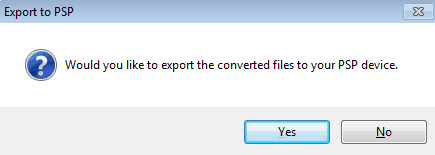
Um die PSP für die Übertragung von Dateien einzurichten, schließen Sie die PSP mit einem USB-Kabel an Ihren PC an und wählen Sie "USB-Anschluss". Nach der Umwandlung Export nach PSP Der Dialog wird angezeigt, in dem Sie aufgefordert werden, die konvertierten Dateien auf Ihr PSP-Gerät zu kopieren.
Das PSP-Dateimanager Der Dialog wird mit zwei Spalten angezeigt.
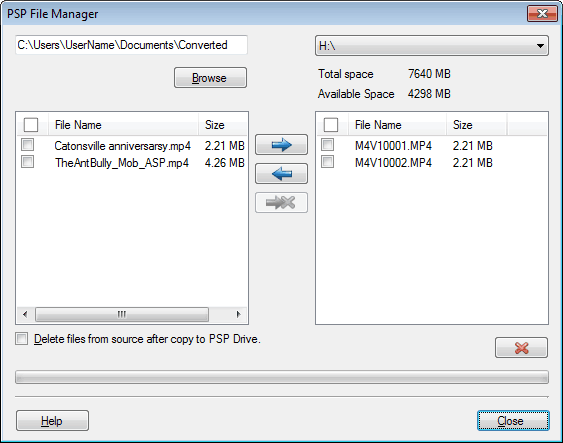
In der linken Spalte wird die Liste der konvertierten Dateien angezeigt. Drücke den  -Symbol, um die Dateien auf Ihr PSP-Gerät zu übertragen. Die übertragenen Dateien werden in der rechten Spalte angezeigt. MP4-Dateien werden zusammen mit den THM-Dateien auf Ihr PSP-Gerät kopiert. -Symbol, um die Dateien auf Ihr PSP-Gerät zu übertragen. Die übertragenen Dateien werden in der rechten Spalte angezeigt. MP4-Dateien werden zusammen mit den THM-Dateien auf Ihr PSP-Gerät kopiert.
Um MPEG-4-Dateien von Ihrem PSP-Gerät auf Ihren PC zu kopieren, klicken Sie auf die Schaltfläche  Symbol. Symbol.
Sie können Ihr PSP-Gerät trennen und Ihre Videos ansehen.
Hinweis: Wenn Sie Dateien für die PlayStation Portable bei der Arbeit an einem Microsoft Windows 7 / Vista-Betriebssystem konvertieren, müssen Sie möglicherweise Digital Media Converter Pro mit Administratorberechtigungen ausführen. PLATZStarten Sie die Anwendung neu, indem Sie mit der rechten Maustaste auf die ausführbare Datei klicken und dann auf "Als Administrator ausführen" klicken.
Einrichten der PSP-Video-Verzeichnisstruktur
Bevor Sie Dateien kopieren, stellen Sie sicher, dass Sie die spezifische Verzeichnisstruktur unten auf Ihrem PSP-Gerät haben. Die Videos müssen im Verzeichnis vorhanden sein MP_ROOT >> 100MNV01. Wenn zum Beispiel Ihr PSP-Laufwerk F: \ ist, dann sollte die Verzeichnisstruktur, wie sie im Bild angezeigt wird, vorhanden sein.
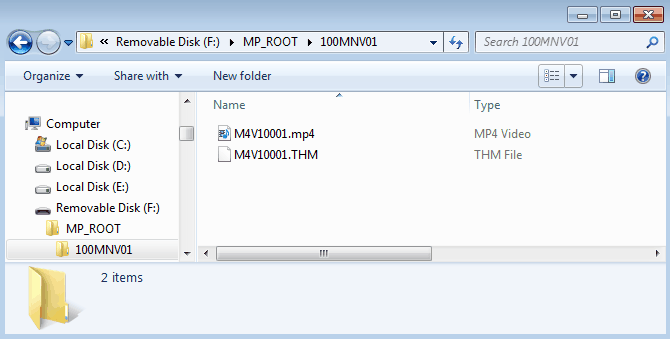
Hinweis: Wenn diese Verzeichnisstruktur nicht existiert, müssen Sie sie erstellen.
Doppelklicken Sie auf den Memory Stick-Laufwerk oder das PSP-Laufwerk aus dem Explorer. Erstellen Sie einen neuen Ordner mit einem Namen MP_ROOT. In diesem Ordner erstellen Sie einen anderen Ordner mit dem Namen 100MNV01.
Der 'PSP File Manager' wird die Verzeichnisstruktur nicht erstellen. Wenn Sie Ihre Dateien nicht in diesen Ordner auf der PSP kopieren, werden Ihre Dateien nicht auf dem Gerät wiedergegeben. Für weitere Details können Sie sich auf das Benutzerhandbuch der Sony-PSP beziehen.
|