|
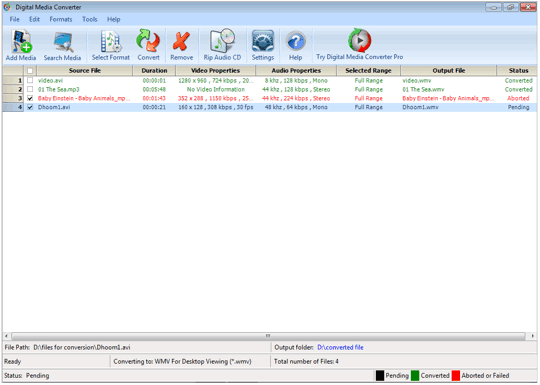
Welcome to Digital Media Converter
Digital Media Converter is the most stable and comprehensive multi format
video converter available. Now, you can effectively organize and convert
your media files into AVI, 3GP, MP4, QuickTime MOV, FLV, DV-AVI, MPEG-1,
MPEG-2 (PAL, NTSC), WMV, DVR-MS, OGM, VOB, ASF, WAV, MP3, Ogg Vorbis (OGG),
AMR, M4A, WMA, RealAudio, Audio CD, AU, SND and AIFF file formats.
Transfer the sound track from an Audio CD (or DVD movie) and save the
audio as an MP3 and get CD information online automatically. You can even
transform your video or audio files into a special streaming format to play
on a web site. Convert thousands of files using the program's batch
conversion feature by selecting a group of files or entire folders and
convert them all in one run.
Digital Media Converter makes your TV shows and movies portable. Record
movies on your Media Center PC and view them on your Apple iPod, Microsoft
Zune, Sony PSP, PDA or almost any portable video player. Put your DVD
collection in your pocket with Digital Media Converter.
You don't need to be a professional to use Digital Media Converter. A
simple 3 step process makes it easy - select the files to convert, the
format to convert into, and start the conversion! The program can be set to
automatically shut down the computer when the conversion is completed.
You don't have to worry about audio or video synchronization problems
while converting. Digital Media Converter allows you to de-interlace all
'interlaced videos' for maximum sharpness and quality.
The Repair Media feature fixes any problems that it might find within
media files. The tool can correct the corrupted headers of AVI files,
retrieve video data from MPEG files with packet synchronization errors or
invalid data. You can correct problems occurring in QuickTime MOV files and
repair corrupted WMV or WMA file which is unseekable.
Digital Media Converter will determine whether an extra codec is required
and helps to find and install it. The program's default settings are
carefully designed to create audio and video files that are both high in
quality and small in size. You can use the advanced settings to change the
video dimensions, audio/video compression codec, frequency and the number of
channels in an audio stream.
Features at a Glance:
Extensive Media Format Support
-
Convert between
AVI, 3GP, MP4, QuickTime MOV, FLV, DV-AVI, MPEG-1, MPEG-2 (PAL, NTSC),
WMV, DVR-MS, OGM, VOB, ASF, WAV, MP3, Ogg Vorbis (OGG), AMR, M4A, WMA,
RealAudio, Audio CD, AU, SND and AIFF
-
Transfer
converted media files to your Apple iPod with iTunes Organizer
-
Convert DVD video between PAL and NTSC
standards
-
Transfer media
files to your Sony PlayStation Portable using PSP File Manager
-
Convert DVR-MS files created by Windows
Media Center
Rip and Extract Audio to MP3
Personalize your Videos
-
Split files automatically or at desired
points
-
Adjust the brightness, contrast and gamma of
video files
-
Remove
interlacing artifacts using De-interlacing settings for video
conversions
Fine-tune Video
and Audio Settings
-
Increase the
volume of converted files up to 400%.
-
Change audio and
video properties independently
-
Synchronize the audio and video content if
video is out of sync
-
Change video
dimensions
-
Choose between
mono and stereo audio channels
-
Retain tags like author, title, artist, and
album when encoding to Windows Media formats (WMV and WMA) and MP3.
-
Retain the
aspect ratio of video files even if you change their dimensions
-
Reduce file size
High Speed Conversion
-
Multi-select files and entire folders for
batch conversion
-
Search and mass-convert audio and video
files from your PC
-
Repair media files to AVI format
-
Auto detect and
fix many types of file format problems during conversion
|