Configure Third Generation Phone Properties
The 3GP video file format is specifically designed to play on mobile phones. Third Generation Mobile Phone (3GP) format produces small files with extension .3GP. These files are created and played on third generation mobile phones using GSM. For CDMA phones, 3G2 format is used.
The compression of videos is quite high so that it can play back with acceptable quality on a small screen, using the low-powered processors of cellular phones. They can be played on a PC using Apple's QuickTime Player.
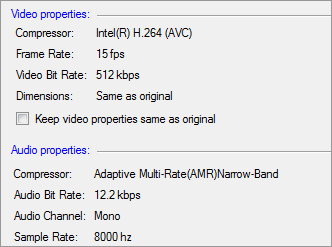
Following properties are configured for 3GP format:
Video Properties
The Intel(R) H.264 (AVC) requires less bandwidth. Thus the media files can be played easily on your mobile phones. The frame rate is set to 15 Fps, and bit rate is 512 Kbps.
Audio Properties
The Adaptive Multi-Rate (AMR) Narrow-Band is adopted as the standard speech codec for 3GP format. It provides better quality and more cell coverage. AAC is only supported by some newer devices. The quality of sound is much better when using this compressor - however you should check if you device supports it. The frequency is set to 8000 Hz and bit rate to 12.2 Kbps. Mono audio channel produces small files but the audio is heard at a constant sound level.
|