Configure QuickTime Properties
Great flexibility is provided in converting the videos to QuickTime MOV format. MOV files can be played using the QuickTime Player on Macintosh and Windows PC. To get high quality output, there are several QuickTime video compressors provided.
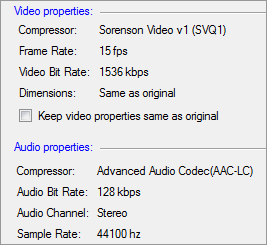
Video Properties
Sorenson Video v1 (SVQ1) compressor delivers high-quality compressed videos. The frame rate is set to 15 fps, and the bit rate is 1536 Kbps. Check Keep Video Properties same as original to retain the original video properties for the converted files.
Audio Properties
The mov files are saved using AAC compressor for sound. The frequency is set to 44100 Hz, and the bit rate is 128 Kbps. The Stereo audio channel creates an impression of sound heard from various directions.
|