|
| Digital Media Converter Pro: Configuring MP3 Properties |
Configuring MP3 Properties
- After adding files to the list, click Tools >> Settings.
- Under General Settings, from the Convert To Audio Format box, select MP3.
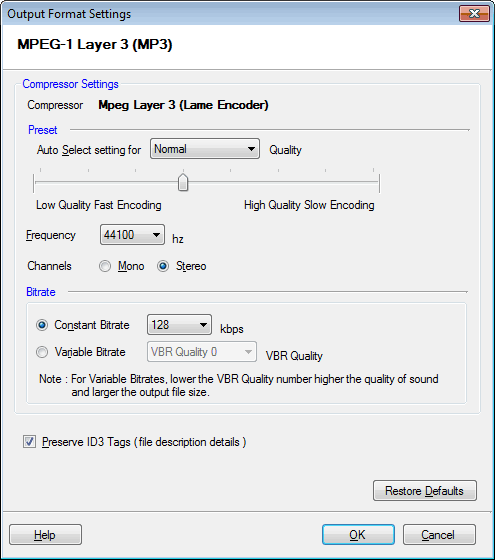
- Select the Properties tab or Properties button.
MP3 is currently the most popular digital audio format. This high quality compressed audio format can be used on almost every portable music player (for example, the Apple iPod) and also played on personal computers and streamed from Internet servers.

Quality
Digital Media Converter Pro features some built-in MP3 presets. These presets are designed to provide the best possible tradeoff of quality and file size. They have been tuned using rigorous listening tests. These presets are highly recommended over any custom set of parameters. The default setting is the Normal preset. To use a Preset, select it from the Auto Select settings for list, or drag the slider. Higher-quality encoding takes longer than lower-quality.
Bitrate:
The Bitrate is the amount of information that is stored in the file to represent each second of audio. If you set a bitrate of 256 Kbps, a 10 second video file will contain 2,560,000 bits of information. The higher the bitrate, the higher the quality but also the larger the size of the file.
There are two ways to encode audio: Constant Bitrate (CBR) and Variable Bitrate (VBR). CBR audio uses exactly the same amount of space to record each second of audio, whether it is complex or very simple. This means that complex sounds may not be reproduced correctly, because there aren't enough bits to describe that second. VBR recording uses an average bitrate, but lets complex time periods use more disk space by "borrowing" some space from parts of the recording which are acoustically simple and can be described using fewer bits. VBR can produce higher quality audio, but not all players support VBR.
You can only adjust CBR bitrates if you have chosen the Custom preset. VBR quality can be adjusted at any time. Generally the default VBR setting of "Quality 0" (best quality) should not be changed.
Frequency
Audio Frequency is the number of times per second that the audio signal can be adjusted. Higher frequency values gives better sound fidelity, but also increases the size of the audio. Select better quality for music and lower quality for speech. To change the audio frequency:
- Select the Custom preset. This will enable the list of audio frequencies.
- Select the desired audio frequency.
44100 Hz is the frequency used in Audio CDs.
Channels
You can choose to create MP3 files with either one audio channel (mono) or separate channels for the right and left speakers. This option does not affect file size.
Add converted music to iTunes
Digital Media Converter Pro can add converted music to iTunes and automatically generate an iTunes playlist. iTunes version 6 or higher is required for this feature.
Preserve ID3 Tags
By default, Digital Media Converter Pro retains metadata (like the song title and artist's name) from your source file. To avoid this uncheck the Preserve ID3 Tags [ file description details ] option.
|